

Factory automation systems require specialized keyboards optimized for machine operation, PLC programming, and CNC control. Automation Keyboard PCB design addresses unique manufacturing environment requirements—from programmable function keys streamlining repetitive tasks to industrial-grade construction surviving factory floor conditions.
HILPCB provides professional PCB fabrication and PCBA assembly services for automation keyboard manufacturers, including industrial protocol interfaces and extended-temperature operation.
Menu Navigation
- PLC, CNC, and SCADA: Application-Specific Keyboard Requirements
- Hardware Macros, Function Keys, and Profile Management
- Profinet, EtherNet/IP, and Industrial Protocol Integration
- Trackball, Touchpad, and Operator Efficiency Features
- Industrial Protocol PCB Manufacturing and Testing
PLC, CNC, and SCADA: Application-Specific Keyboard Requirements
Different automation applications impose specific keyboard requirements informing design decisions for optimal operator productivity and system integration.
PLC programming stations, CNC machine consoles, and SCADA workstations each present distinct interface and durability requirements that affect PCB design choices.
Application-Specific Requirements
- PLC Programming Stations: Full keyboard layout for efficient code entry; function keys mapped to common programming operations; extended character support for ladder logic symbols; durability for continuous development use.
- CNC Machine Operation: Numeric keypad prominence for coordinate entry; dedicated axis control keys for manual positioning; override controls for feed rate and spindle speed adjustment; E-stop integration per machine safety requirements.
- SCADA Workstations: Complete keyboard functionality for system configuration; multiple workstation deployment in control room environments; 24/7 continuous operation capability; clean design minimizing contamination accumulation.
- Robot Teach Pendants: Compact layout for handheld operation; deadman switch integration for safety compliance; IP65+ protection for production floor deployment; impact resistance for industrial handling.
- Machine Tool Consoles: Dedicated keys for tool change, program select, and cycle control; integrated pointing device eliminating separate mouse; membrane construction for coolant resistance.
- Process Control Panels: Function keys programmed for specific process operations; status indication LEDs showing system state; sealed construction for process environment exposure.
Durability Requirements
Automation keyboards must survive 24/7 operation across multiple shifts. Switch ratings of 10M+ cycles minimum ensure multi-year service life without key failure affecting production operations.
Hardware Macros, Function Keys, and Profile Management
Programmable keys accelerate automation workflows by providing single-key access to complex operations, reducing operator input time and minimizing errors.
Hardware macro capability, function key layers, and software integration combine to optimize keyboard efficiency for specific automation applications.
Programmability Implementation
- Hardware Macro Storage: On-keyboard memory stores macro sequences independent of host software; survives host system changes; immediate execution without driver delay.
- Extended Function Key Range: F13-F24 keys beyond standard keyboard provide additional programmable functions; context-sensitive layers multiply available functions per key.
- LED Function Indication: Per-key LED indication shows active function mode; color coding differentiates function layers; brightness levels indicate key state (active, standby, disabled).
- Profile Management: Multiple stored profiles for different applications or operators; profile selection via dedicated key or host command; automatic profile switching based on active application.
- Custom Key Legends: Application-specific key labels using dye-sublimation or laser engraving; replaceable key caps for flexible reconfiguration; color-coded keys grouping related functions.
- Software Configuration Utility: Windows/Linux utility for macro programming; import/export capability for profile backup; firmware update through configuration software.
Macro Execution Reliability
Macro execution must be deterministic for automation applications. Hardware-based macro storage and execution eliminates software timing variability affecting production operations.
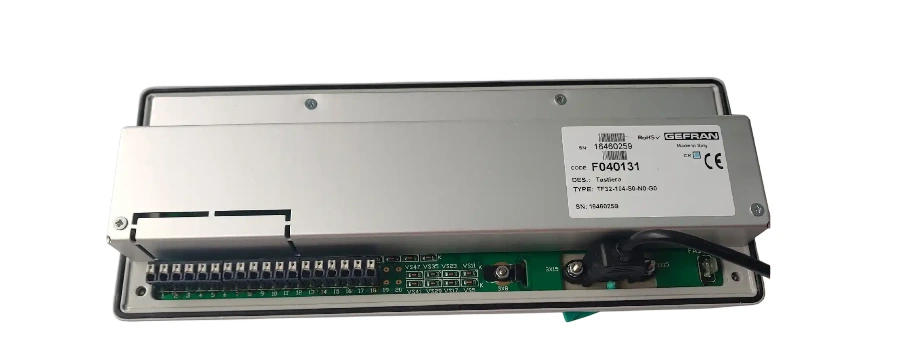
Profinet, EtherNet/IP, and Industrial Protocol Integration
Automation keyboards interface with diverse control systems using appropriate communication standards, from standard USB to specialized industrial protocols.
Interface selection depends on target control system architecture, with many applications requiring multiple interface options for maximum deployment flexibility.
Interface Options
- USB HID Interface: Universal compatibility with Windows, Linux, and industrial operating systems; standard HID class eliminates driver requirements; USB 2.0 full-speed adequate for keyboard scan rates.
- PS/2 Legacy Support: Many industrial PCs and older PLCs require PS/2 interface; keyboard controllers supporting dual USB/PS/2 output maximize deployment flexibility.
- Serial RS-232/RS-485: Direct connection to PLCs and embedded controllers; RS-485 multi-drop enables single keyboard serving multiple stations; protocol converters bridge to proprietary systems.
- Profinet Integration: Native Profinet device implementation for Siemens automation environments; keyboard appears as network device without intermediate PC; real-time key state updates.
- EtherNet/IP Support: Direct integration with Rockwell automation systems; keyboard I/O mapped to PLC tags; network-wide access to keyboard status and configuration.
- Modbus TCP/RTU: Universal industrial protocol compatibility; register-based key state reporting; configuration through Modbus commands.
Safety Circuit Design
Safety-critical applications require dedicated E-stop and enable switch circuits with safety-rated components, independent of main keyboard processor for fail-safe operation.
Trackball, Touchpad, and Operator Efficiency Features
Features enhancing operator productivity differentiate automation keyboards from standard industrial input devices, improving workflow speed and reducing operator fatigue.
Integrated pointing devices, status displays, and ergonomic design collectively optimize the operator interface for production environments.
Productivity Enhancements
- Integrated Trackball: Precision cursor control without removing hands from keyboard; sealed trackball construction resists contamination; adjustable sensitivity for different applications.
- Touchpad Alternative: Low-profile pointing with multi-touch gesture support; easier cleaning than mechanical trackball; suitable for clean room and food processing environments.
- Status Display Integration: Small LCD or OLED showing active profile, macro status, or system information; I2C or SPI interface to keyboard controller; reduces operator attention shifts to main screen.
- LED Status Indicators: Dedicated LEDs showing connection status, lock states, and custom function status; easily visible from operator position; configurable indication through host software.
- Ergonomic Key Layout: Reduced force switches minimizing operator fatigue during extended use; appropriate key spacing for gloved operation; wrist rest integration for desktop installations.
- Quiet Operation: Low-noise switch options for control room environments; membrane switches eliminate mechanical click; rubber dome provides quiet tactile feedback.
Environmental Design
Sealed construction prevents contamination ingress while smooth surfaces enable easy cleaning. Chemical-resistant materials withstand industrial cleaning agents.
Industrial Protocol PCB Manufacturing and Testing
Automation keyboards with industrial protocol interfaces require manufacturing capabilities supporting Ethernet PHY circuits, industrial-rated components, and protocol-specific testing. HILPCB provides complete manufacturing for protocol-enabled industrial keyboards.
Why Choose HILPCB for Automation Keyboard PCB
Industrial Ethernet Design Support
Industrial protocols like Profinet and EtherNet/IP require proper Ethernet PHY implementation. Our FR4 PCB fabrication provides:
- Controlled impedance for Ethernet differential pairs (100Ω ±10%)
- Proper layer stack-up for EMC compliance
- Adequate creepage/clearance for industrial isolation requirements
Industrial-Rated Component Assembly
Automation keyboards use extended-temperature components for factory environments. Our SMT assembly handles:
- Industrial Ethernet PHY with enhanced ESD ratings
- Extended-temperature microcontrollers (-40°C to +85°C)
- Industrial-rated magnetics and protection components
Protocol-Specific Testing
Beyond standard functional testing, we support industrial protocol verification:
- Ethernet connectivity and link testing
- Basic protocol communication verification
- Interface compatibility documentation
Mixed-Technology Assembly
Automation keyboards combine SMT electronics with through-hole switches, encoders, and connectors. Our assembly handles:
- SMT component placement with AOI verification
- Through-hole soldering for mechanical robustness
- Conformal coating application for environmental protection
Production Flexibility
- Small batch assembly for custom PLC keyboard configurations
- Large volume assembly for standard automation keyboard products
- Turnkey assembly sourcing industrial-rated Ethernet PHY and magnetics
Rapid Prototyping Support
Protocol-enabled keyboards require integration testing with target control systems. Our quick-turn prototype capability accelerates your development cycle.
Contact us with your automation keyboard design for manufacturing review and protocol interface assessment.
Common Questions
What matters most in an automation keyboard PCB design?
The key priorities are application-specific layout, durable switch and connector choices, clear operator feedback, and the right interface mix for PLC, CNC, or SCADA deployment. A strong design also treats safety functions, environmental sealing, and long-shift reliability as first-class requirements.
When is direct industrial protocol support worth adding to an automation keyboard?
It is most valuable when the keyboard must connect directly to a PLC or automation network without relying on an intermediate PC. In those cases, native Profinet, EtherNet/IP, Modbus, or serial support can simplify deployment and provide more deterministic access to key state, macro functions, and system status.
Which production checks matter most for a protocol-enabled automation keyboard?
The highest-value checks are interface integrity around Ethernet or serial circuits, functional verification of key scanning and macros, validation of E-stop or enable paths where present, and assembly robustness for switches, connectors, and protection parts. Those controls help confirm that the keyboard will survive real factory use instead of only passing a bench test.